Tampilkan postingan dengan label Combination Rom. Tampilkan semua postingan

Jumat, 15 Maret 2019

Combination Rom Samsung A10 SM-A105


Cara flashing samsung menggunakan file kombinasi dan odin tool :
1.Power off phone dan masuk ke mode download dengan cara tekan dan tahan tombol (vol up + vol down) pada smartphone anda dan sambung perangkat dengan kabel usb , kemudian untuk melanjutkan “Continue” tekan tombol vol up
2.Buka odin dan hubungkan handphone ke pc kemudian flash dengan file kombinasi
3.Pilih file dan input ke kolom AP , kemudian klik start
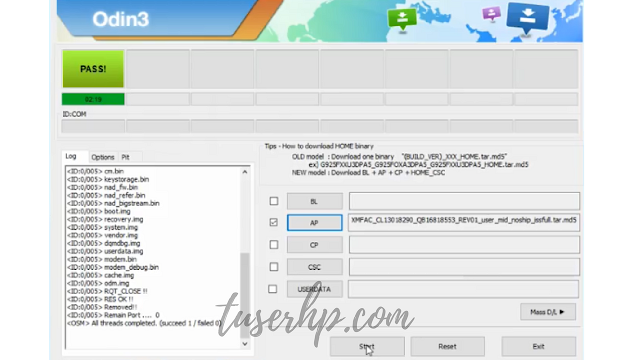

4.Tunggu proses flashing selesai di tandai notif PASS pada odin
5.Kemudian handphone akan restart , tunggu sampai proses selesai


Note :
Untuk restart handphone dengan menekan dan tahan tombol (vol down + power) , setelah phone power off segera tekan tombol (vol up + power) kemudian lepaskan , handphone akan masuk ke recovery mode silahkan wipe data/factory reset kemudian reboot now

DOWNLOAD :
Samsung Odin Tool & Driver
Samsung 300K Tool (Download Mode)

ROM COMBINATION SAMSUNG A10 SM-A105 :
1. Samsung Galaxy A10 (SM-A105F)
COMBINATION_FAC_FA90_A105FXXU1ASB6.rar
2. Samsung Galaxy A10 (SM-A105G)
3. Samsung Galaxy A10 (SM-A105M)
Uploading soon.........

Read more :
Bypass FRP Samsung M20 (SM-M205)
FIRMWARE SAMSUNG M10 SM-M105F
FIRMWARE SAMSUNG M20 SM-M205G/F
FIRMWARE SAMSUNG M30 SM-M305G/F
SAMSUNG COMBINATION FILE BIG COLLECTION 2018

TRY At Your Own Risk ( silahkan dicoba , resiko ditanggung sendiri )

#Extra tag :
SM-A105
Bypass Frp Samsung A10
Samsung A10 frp bypass
frp remove A10 SM-A105
Combination file SM-A105F
A10 (SM-A105) lock remove
file samsung A10 SM-A105
Combination File samsung SM-A105G
samsung A10 Combination File Binary 1
samsung combination file free
combination file download
Combination Files Bit 1 samsung A10
samsung A10 SM-A105 hard reset
Bypass Google Account Samsung A10
Google account bypass samsung SM-A105
Hapus akun google samsung A10

Jumat, 01 Maret 2019

Combination Rom Samsung M30 SM-M305


Cara flashing samsung menggunakan file kombinasi dan odin tool :
1.Power off phone dan masuk ke mode download dengan cara tekan dan tahan tombol (vol up + vol down) pada smartphone anda dan sambung perangkat dengan kabel usb , kemudian untuk melanjutkan “Continue” tekan tombol vol up
2.Buka odin dan hubungkan handphone ke pc kemudian flash dengan file kombinasi
3.Pilih file dan input ke kolom AP , kemudian klik start


4.Tunggu proses flashing selesai di tandai notif PASS pada odin
5.Kemudian handphone akan restart , tunggu sampai proses selesai

Cara Bypass FRP Samsung Menggunakan File Kombinasi

Note :
Untuk restart handphone dengan menekan dan tahan tombol (vol down + power) , setelah phone power off segera tekan tombol (vol up + power) kemudian lepaskan , handphone akan masuk ke recovery mode silahkan wipe data/factory reset kemudian reboot now

DOWNLOAD :
Samsung Odin Tool & Driver
Samsung 300K Tool (Download Mode)

ROM COMBINATION SAMSUNG M30 SM-M305 :
Uploading soon.........

Read more :
Bypass FRP Samsung M20 (SM-M205)
FIRMWARE SAMSUNG M10 SM-M105F
FIRMWARE SAMSUNG M20 SM-M205G/F
FIRMWARE SAMSUNG M30 SM-M305G/F
SAMSUNG COMBINATION FILE BIG COLLECTION 2018

TRY At Your Own Risk ( silahkan dicoba , resiko ditanggung sendiri )
#Extra tag :
SM-M305
Bypass Frp Samsung M30
Samsung M30 frp bypass
frp remove M30 SM-M305
Combination file SM-M305F
M30 (SM-M305) lock remove
file samsung M30 SM-M305
Combination File samsung SM-M305FG
samsung M30 Combination File Binary 1
samsung combination file free
combination file download
Combination Files Bit 1 samsung M30
samsung M30 SM-M305 hard reset
Bypass Google Account Samsung M30
Google account bypass samsung SM-M305
Hapus akun google samsung M30

Selasa, 26 Februari 2019

Combination Rom Samsung A50 SM-A505


Cara flashing samsung menggunakan file kombinasi dan odin tool :
1.Power off phone dan masuk ke mode download dengan cara tekan dan tahan tombol (vol up + vol down) pada smartphone anda dan sambung perangkat dengan kabel usb , kemudian untuk melanjutkan “Continue” tekan tombol vol up
2.Buka odin dan hubungkan handphone ke pc kemudian flash dengan file kombinasi
3.Pilih file dan input ke kolom AP , kemudian klik start


4.Tunggu proses flashing selesai di tandai notif PASS pada odin
5.Kemudian handphone akan restart , tunggu sampai proses selesai

Note :
Untuk restart handphone dengan menekan dan tahan tombol (vol down + power) , setelah phone power off segera tekan tombol (vol up + power) kemudian lepaskan , handphone akan masuk ke recovery mode silahkan wipe data/factory reset kemudian reboot now

DOWNLOAD :
New Odin3 v3.13.2
Samsung Odin Tool & Driver
Samsung 300K Tool (Download Mode)

ROM COMBINATION SAMSUNG A30 SM-A305 :
Uploading soon.........

Read more :
FIRMWARE SAMSUNG A50 SM-A505
FIRMWARE SAMSUNG A30 SM-A305
FIRMWARE SAMSUNG S10 SM-MG973
FIRMWARE SAMSUNG S10e SM-MG970
FIRMWARE SAMSUNG M10 SM-M105F
FIRMWARE SAMSUNG M20 SM-M205G/F
FIRMWARE SAMSUNG M30 SM-M305G/F
FIRMWARE SAMSUNG A9 (2018) SM-A920
SAMSUNG COMBINATION FILE BIG COLLECTION 2018

TRY At Your Own Risk ( silahkan dicoba , resiko ditanggung sendiri )

Cara Bypass FRP Samsung Menggunakan File Kombinasi


#Extra tag :
SM-A505
Bypass Frp Samsung A50
Samsung A50 frp bypass
A50 SM-A505 frp remove
Combination file A50 SM-A505
A50 (SM-A505) lock remove
file samsung A50 SM-A505
Combination File samsung A50 SM-A505
samsung A50 Combination File Binary 1
samsung combination file free
combination file download
Combination Files Bit 1 samsung A50
samsung A50 SM-A505 hard reset
Bypass Google Account Samsung A50
Google account bypass samsung SM-A505
Hapus akun google samsung A50

Combination Rom Samsung A30 SM-A305


Cara flashing samsung menggunakan file kombinasi dan odin tool :
1.Power off phone dan masuk ke mode download dengan cara tekan dan tahan tombol (vol up + vol down) pada smartphone anda dan sambung perangkat dengan kabel usb , kemudian untuk melanjutkan “Continue” tekan tombol vol up
2.Buka odin dan hubungkan handphone ke pc kemudian flash dengan file kombinasi
3.Pilih file dan input ke kolom AP , kemudian klik start


4.Tunggu proses flashing selesai di tandai notif PASS pada odin
5.Kemudian handphone akan restart , tunggu sampai proses selesai

Note :
Untuk restart handphone dengan menekan dan tahan tombol (vol down + power) , setelah phone power off segera tekan tombol (vol up + power) kemudian lepaskan , handphone akan masuk ke recovery mode silahkan wipe data/factory reset kemudian reboot now

DOWNLOAD :
New Odin3 v3.13.2
Samsung Odin Tool & Driver
Samsung 300K Tool (Download Mode)

ROM COMBINATION SAMSUNG A30 SM-A305 :
Uploading soon.........

Read more :
FIRMWARE SAMSUNG A30 SM-A305
FIRMWARE SAMSUNG S10 SM-MG973
FIRMWARE SAMSUNG S10e SM-MG970
FIRMWARE SAMSUNG M10 SM-M105F
FIRMWARE SAMSUNG M20 SM-M205G/F
FIRMWARE SAMSUNG M30 SM-M305G/F
FIRMWARE SAMSUNG A9 (2018) SM-A920
SAMSUNG COMBINATION FILE BIG COLLECTION 2018

TRY At Your Own Risk ( silahkan dicoba , resiko ditanggung sendiri )

Cara Bypass FRP Samsung Menggunakan File Kombinasi


#Extra tag :
SM-A305
Bypass Frp Samsung A30
Samsung A30 frp bypass
A30 SM-A305 frp remove
Combination file SM-A305
Samsung A30 (SM-A305) lock remove
file samsung A30 SM-A305
Combination File samsung A30 SM-A305
samsung A30 Combination File Binary 1
samsung combination file free
combination file download
Combination Files Bit 1 samsung A30
samsung A30 SM-A305 hard reset
Bypass Google Account Samsung A30
Google account bypass samsung SM-A305
Hapus akun google samsung A30 android 9 pie

Senin, 25 Februari 2019

Combination Rom Samsung S10 Plus SM-G975


Cara flashing samsung menggunakan file kombinasi dan odin tool :
1.Power off phone dan masuk ke mode download dengan cara tekan dan tahan tombol (vol up + vol down) atau (vol down + Bixby + power) pada smartphone anda dan sambung perangkat dengan kabel usb , kemudian untuk melanjutkan “Continue” tekan tombol vol up
2.Buka odin dan hubungkan handphone ke pc kemudian flash dengan file kombinasi
3.Pilih file dan input ke kolom AP , kemudian klik start


4.Tunggu proses flashing selesai di tandai notif PASS pada odin
5.Kemudian handphone akan restart , tunggu sampai proses selesai

Note : Jika ponsel stuck logo, lakukan wipe data/factory reset pada mode recovery
Untuk restart handphone dengan menekan dan tahan tombol (vol down + power) , setelah phone power off segera tekan tombol (vol up + Bixby + power) kemudian lepaskan , handphone akan masuk ke recovery mode silahkan wipe data/factory reset kemudian reboot now

DOWNLOAD :

New Odin3 v3.13.2
Samsung Odin Tool & Driver
Samsung 300K Tool (Download Mode)

ROM COMBINATION SAMSUNG S10 Plus SM-G975 :
COMBINATION_FAC_FA90_G975FXXU1ASB1
Read more :
FIRMWARE SAMSUNG S10 SM-MG973
FIRMWARE SAMSUNG S10e SM-MG970
FIRMWARE SAMSUNG M10 SM-M105F
FIRMWARE SAMSUNG M20 SM-M205G/F
FIRMWARE SAMSUNG M30 SM-M305G/F
FIRMWARE SAMSUNG A9 (2018) SM-A920
SAMSUNG COMBINATION FILE BIG COLLECTION 2018

TRY At Your Own Risk ( silahkan dicoba , resiko ditanggung sendiri )

Cara Bypass FRP Samsung Menggunakan File Kombinasi


#Extra tag :
SM-G975
Bypass Frp Samsung S10+
Samsung S10+ frp bypass
SM-G975 frp remove
Combination file SM-G975
S10+ (SM-G975) lock remove
file samsung S10+ sm-975
Combination File samsung S10 Plus
samsung S10+ Combination File Binary 1
samsung combination file free
combination file download
Combination Files Bit 1 samsung S10+
samsung S10+ sm-975 hard reset
Bypass Google Account Samsung S10 Plus
Google account bypass samsung S10+
Hapus akun google samsung S10 Plus

Combination Rom Samsung S10 SM-G973


Cara flashing samsung menggunakan file kombinasi dan odin tool :
1.Power off phone dan masuk ke mode download dengan cara tekan dan tahan tombol (vol up + vol down) atau (vol down + Bixby + power) pada smartphone anda dan sambung perangkat dengan kabel usb , kemudian untuk melanjutkan “Continue” tekan tombol vol up
2.Buka odin dan hubungkan handphone ke pc kemudian flash dengan file kombinasi
3.Pilih file dan input ke kolom AP , kemudian klik start


4.Tunggu proses flashing selesai di tandai notif PASS pada odin
5.Kemudian handphone akan restart , tunggu sampai proses selesai

Note : Jika ponsel stuck logo, lakukan wipe data/factory reset pada mode recovery
Untuk restart handphone dengan menekan dan tahan tombol (vol down + power) , setelah phone power off segera tekan tombol (vol up + Bixby + power) kemudian lepaskan , handphone akan masuk ke recovery mode silahkan wipe data/factory reset kemudian reboot now

DOWNLOAD :

New Odin3 v3.13.2
Samsung Odin Tool & Driver
Samsung 300K Tool (Download Mode)

ROM COMBINATION SAMSUNG S10 SM-G973 :
COMBINATION_FAC_FA90_G973FXXU1ASB2
Read more :
FIRMWARE SAMSUNG S10 SM-MG973
FIRMWARE SAMSUNG S10e SM-MG970
FIRMWARE SAMSUNG M10 SM-M105F
FIRMWARE SAMSUNG M20 SM-M205G/F
FIRMWARE SAMSUNG M30 SM-M305G/F
FIRMWARE SAMSUNG A9 (2018) SM-A920
SAMSUNG COMBINATION FILE BIG COLLECTION 2018

TRY At Your Own Risk ( silahkan dicoba , resiko ditanggung sendiri )

Cara Bypass FRP Samsung Menggunakan File Kombinasi


#Extra tag :
SM-G973
Bypass Frp Samsung S10
Samsung S10 frp bypass
SM-G973 frp remove
Combination file SM-G973
S10 (SM-G973) lock remove
file samsung S10 sm-973
Combination File samsung S10
samsung S10 Combination File Binary 1
samsung combination file free
combination file download
Combination Files Bit 1 samsung S10
samsung S10 sm-973 hard reset
Bypass Google Account Samsung S10
Google account bypass samsung S10
Hapus akun google samsung S10

Combination Rom Samsung S10e (SM-G970)


Cara flashing samsung menggunakan file kombinasi dan odin tool :
1.Power off phone dan masuk ke mode download dengan cara tekan dan tahan tombol (vol up + vol down) atau (vol down + Bixby + power) pada smartphone anda dan sambung perangkat dengan kabel usb , kemudian untuk melanjutkan “Continue” tekan tombol vol up
2.Buka odin dan hubungkan handphone ke pc kemudian flash dengan file kombinasi
3.Pilih file dan input ke kolom AP , kemudian klik start


4.Tunggu proses flashing selesai di tandai notif PASS pada odin
5.Kemudian handphone akan restart , tunggu sampai proses selesai

Note : Jika ponsel stuck logo, lakukan wipe data/factory reset pada mode recovery
Untuk restart handphone dengan menekan dan tahan tombol (vol down + power) , setelah phone power off segera tekan tombol (vol up + Bixby + power) kemudian lepaskan , handphone akan masuk ke recovery mode silahkan wipe data/factory reset kemudian reboot now

DOWNLOAD :

New Odin3 v3.13.2
Samsung Odin Tool & Driver
Samsung 300K Tool (Download Mode)

ROM COMBINATION SAMSUNG S10e SM-G970 :
COMBINATION_FAC_FA90_G970FXXU1ASB2
Read more :
FIRMWARE SAMSUNG S10e SM-MG970
FIRMWARE SAMSUNG M10 SM-M105F
FIRMWARE SAMSUNG M20 SM-M205G/F
FIRMWARE SAMSUNG M30 SM-M305G/F
FIRMWARE SAMSUNG A9 (2018) SM-A920
SAMSUNG COMBINATION FILE BIG COLLECTION 2018

TRY At Your Own Risk ( silahkan dicoba , resiko ditanggung sendiri )

Cara Bypass FRP Samsung Menggunakan File Kombinasi


#Extra tag :
SM-G970
Bypass Frp Samsung s10e
Samsung S10e frp bypass
SM-G970 frp remove
Combination file SM-G970
S10e (SM-G970) lock remove
file samsung s10e sm-970
Combination File samsung S10e
samsung S10e Combination File Binary 1
samsung combination file free
combination file download
Combination Files Bit 1 samsung S10e
samsung S10e sm-970 hard reset
Bypass Google Account Samsung S10e
Google account bypass samsung S10e
Hapus akun google samsung S10e