Tampilkan postingan dengan label TOOLS. Tampilkan semua postingan

Selasa, 21 Juli 2020

Research Download - SPD Flash Tool R24.0.0003 All Versions

https://perrojaus.blogspot.com/2020/07/research-download-spd-flash-tool.html


What Is Research Download Tool?
Research Download is the official flash tool for SPD (Spreadtrum) devices, developed by Unisoc Technologies Co., Ltd. and Spreadtrum Communications Inc. It is a Windows operating system program that supports all old and modern smartphones and tablets based on the SPD processor. And this tool only supports .pac and .p5s extension (firmware/stock ROM) packet files.

What Are the Features of the Research Download Tool?

Research Download Tool Features List:

  • Read Flash.
  • Write Flash.
  • Erase Flash.
  • Erase All Flash.
  • Modify Packet Files.
  • Merge NV.
  • Repartition.
  • Keep Charge While Flashing.
  • Set Debug Level.
  • UART Download.
  • End of Download (Reset to Normal, Power Off, Dump Uboot Log).
  • Read Option (Read MCP Type, Read Chip UID, Read Partition).
  • Check Option (Check Match, DDR Check, EMMC Check, Self Refresh, Check Second Hand Memory).
  • Auto Comparison
  • Multi-Languages.
  • LCD Configuration.
  • MCT Type.
  • Vol-Freq Turning.
  • UART Port Switch.


How to Flash the Firmware with Research Download Tool?
  1. First of all, you need to download the required Flash Tool program and the firmware file according to your mobile device. If you have already downloaded it, then skip this step.
  2. Now extract the compressed file of Flash tool with the latest version of WinRAR.
  3. Right-click on the "ResearchDownload.exe" setup file and run it in administrator mode.
  4. Click the Load Packet button in the upper left corner and select the .pac firmware file. Once you select the firmware file, the Flash tool will take some time to load the file, so be patient.
  5. After successfully loading the firmware file into the tool, click the third "Start Downloading" button of the program.
  6. Then turn off the mobile device, press the boot key (volume up + volume down), and connect to the computer.
  7. As soon as you connect your mobile device to the computer, the flashing process starts, and after the flashing process is completed, you will see Previous Passed written in green in the progress bar.
  8. Finally, disconnect your mobile device from the computer and turn on the power; For the first time since the flash, the mobile will take about five to ten minutes to power on.
Make sure you have the SPD (spreadtrum) USB drivers installed on your computer before you start the flash process, if not you can download it from this link.
What Are the Contents of Research Download Tool Files?
-SPD Research Tool R24.0.0003
Driver
Log
ReadFlash
_key.ini
BinPack.ini
BMAConfig.xml
BMAFrame9.dll
BMError.ini
BMFileType.ini
BMPlatform9.dll
BMTimeout.ini
Channel.ini
Channel9.dll
Channel9D.dll
ChannelD.dll
CmdDloader.exe
CmdDloader.ini
Codec.dll
iSpLog.dll
iSpLog.ini
LiveUpdatesDLL.dll
LiveUpdatesDLL.ini
MCPType.ini
PhaseCheck.ini
PortHound.dll
PortHoundd.dll
ProcessFlow.dll
ProcessFlowSetting.ini
rdl_bkmark.bmp
ResearchDownload.exe
ResearchDownload.ini
RSAKeyGen.exe
SecBinPack9.dll
SecBinPack9D.dll
Sparce2Raw.dll
SprdMes.ini
SprdMesApp.dll

-Driver
Download.url

-Log
BMAF_2020_07_21.log

What Are the Additional Details of the Research Download Tool?
You can find additional information about this drivers in the table below. And if you believe there's something wrong with the information in this post, feel free to let us know at our email address admin@gsmfirmware.net or in the comments section below. We will be grateful to you for that.

Name Data
Program Research Download
Version 24.0.0003
Size 5.98 MB
Date Monday, July 20, 2020
Visits ...
Downloads ...
Price Free
Developer Unisoc Technologies Co., Ltd./SpreadTrum Communication Inc.
Category Tools
Requirement Windows XP, 7, 8, 10
Password perrojaus.blogspot.com

Download Link of Research Download - SPD Flash Tool.

  • SPD Research Tool R24.0.0003.rar
  • SPD Research Tool R23.19.5101.rar
  • SPD Research Tool R23.19.3301.rar
  • SPD Research Tool R23.0.0001.rar
  • SPD Research Tool R22.19.1301.rar
  • SPD Research Tool R21.0.0001.rar
  • SPD Research Tool R19.0.0001.rar
  • SPD Research Tool R17.0.0001.rar
  • SPD Research Tool R8.0.0001.rar
  • SPD Research Tool R7.0.0001.rar
  • SPD Research Tool R6.0.0001.rar
  • SPD Research Tool R4.0.0001.rar
  • SPD Research Tool R3.15.4901.rar
  • SPD Research Tool R3.0.900.rar
  • SPD Research Tool R3.0.0001.rar
  • SPD Research Tool R2.10.1003.rar
  • SPD Research Tool R2.10.1001.rar
  • SPD Research Tool R2.9.9017.rar
  • SPD Research Tool R2.9.9016.rar
  • SPD Research Tool R2.9.9015.rar
  • SPD Research Tool R2.9.9009.rar
  • SPD Research Tool R2.9.9008.rar
  • SPD Research Tool R2.9.9005.rar
  • SPD Research Tool R2.9.9001.rar
  • SPD Research Tool R2.9.8005.rar
  • SPD Research Tool R2.9.8004.rar
  • SPD Research Tool R2.9.7017.rar
  • SPD Research Tool R2.9.7009.rar
  • SPD Research Tool R2.9.7008.rar
  • SPD Research Tool R2.9.7007.rar
  • SPD Research Tool R2.9.7006.rar
  • SPD Research Tool R2.9.7003.rar
  • SPD Research Tool R2.9.7002.rar
  • SPD Research Tool R2.9.7001.rar
  • SPD Research Tool R2.9.6011.rar

The default password for compressed files is "perrojaus.blogspot.com".

Minggu, 12 Juli 2020

WWR MTK Tool V2.51 - MediaTek Scatter Stock ROM Modifier

https://perrojaus.blogspot.com/2020/07/wwr-mtk-tool.html


What Is the WWR MTK Tool?
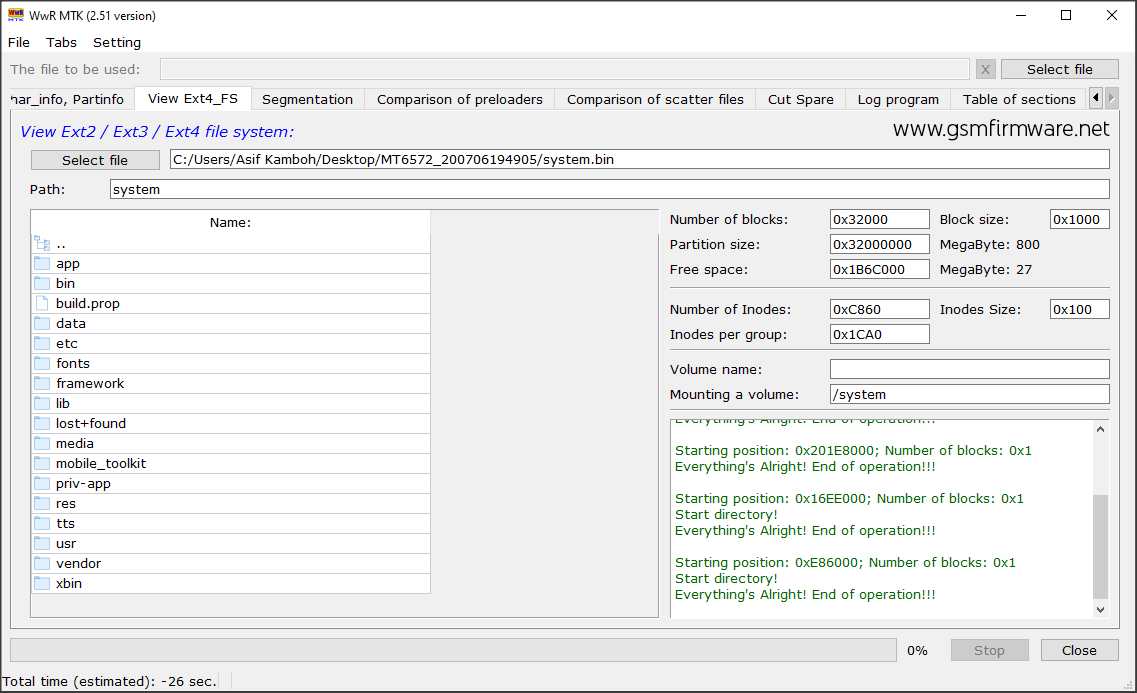
The abbreviation of WWR MTK is working with ROM MediaTek. WWR MTK Tool is a MediaTek scatter firmware modifier program. Which works with ROM files read from the device using SP Flash tool based on MTK processors.

This is a Windows operating system program developed in English and Russian, designed by Ilya.

When the user launches the program, an advertisement message will appear on the screen for 120 seconds. If you want to stop the startup waiting message, "Tired of waiting for constant pause? Donate to the project, and there will be no pause!" So you have to buy this tool by donating 10$ to the developer.

What Are the Features of WWR MTK Tool?
  • Pulls Preloader.bin from the dump of the ROM file.
  • You can cut out a specific portion of the reading memory.
  • Cut the ROM file into parts based on the Scatter file.
  • Comparison of scatters firmware/stock ROM and preloader files.
  • Finds PMT, PGPT (SGPT) sections.
  • Creates a scatter file based on the PMT, PGPT (SGPT) information sections.
  • Calculates the name of partitions, their starts, and lengths from Recovery_log.
  • Works on ADB. Creates backup copies of partitions (if you have root rights).
  • Create a scatter file for root privileged devices on the MTK platform.
  • Backup firmware of any Android devices (root required).
  • Cuts unnecessary sectors from a read memory dump from phones with NAND memory.
  • Browse EXT4 partitions in the ROM file itself, extract files (only files) from EXT4 to ROM.
  • Creation of empty EXT4 partitions, for a given length, the ability to convert to sparse image.
  • Create empty partitions or files filled with zeros or random numbers.
  • When you open the ROM file, instantly view the partition table GPT, PMT, MBR.
How to Buy a Premium License for WWR MTK Tool V2.51?
  1. There is a different way to activate this program than other regular programs. First, you need to download the WWR MTK program from the links below.
  2. Next, extract the compressed file and run the program's "WWR_MTK_2_51.exe" setup file. As you run the setup file, an advertisement window will appear on the screen for 120 seconds, and then the program interface will open after that ad.
  3. After successfully launching the program, click on the Settings tab, and click on the About program option. As soon as you click on the About program window, a secret key will appear at the bottom of the window about it, copy it.
  4. Send ten dollars to the PayPal email address vvaaavv@mail.ru of the developer of the program, take a screenshot of the payment transaction, and send it to the developer's email address vvaaavv@mail.ru with the secret key of the program.
  5. Then you'll have to wait a day or so; then, the developer will send you a unique "wwr.key" file via email, which will need to be placed in the program folder.
  6. As soon as you place the key file inside the program folder, the program will convert to the premium version.
This program needs to have Visual C ++ installed to work correctly. official Visual C ++ website

Image of the WWR MTK Tool.
http://perrojaus.blogspot.com/2020/07/wwr-mtk-tool.html


What Are the Contents of the WWR MTK Tool Files?
-WWR MTK v2.30
plugins
icudt51.dll
icuin51.dll
icuuc51.dll
libgcc_s_dw2-1.dll
libstdc++-6.dll
libwinpthread-1.dll
LogFiles.txt
qminimal.dll
qt.conf
Qt5Core.dll
Qt5Gui.dll
Qt5Network.dll
Qt5Widgets.dll
qwindows.dll
setting.ini
Template.ini
Version.txt
WwR_MTK_v2.30.exe

-plugins
Images
platforms

-Images
200.jpg
201.jpg
202.jpg
203.jpg
204.jpg
205.jpg
206.jpg
207.jpg
208.jpg
209.jpg
210.jpg
211.jpg
212.jpg
213.jpg
214.jpg
215.jpg
216.jpg
217.jpg
218.jpg
219.jpg
220.jpg
221.jpg
222.jpg

-platforms
200.jpg
qminimal.dll
qoffscreen.dll
qwindows.dll

-WWR MTK v2.40
adb
plugins
www
delete.txt
emmc.txt
files_for_delete.txt
icudt51.dll
icuin51.dll
icuuc51.dll
libgcc_s_dw2-1.dll
libstdc++-6.dll
libwinpthread-1.dll
LogFiles.txt
qminimal.dll
qt.conf
Qt5Core.dll
Qt5Gui.dll
Qt5Multimedia.dll
Qt5MultimediaWidgets.dll
Qt5Network.dll
Qt5OpenGL.dll
Qt5Positioning.dll
Qt5PrintSupport.dll
Qt5Qml.dll
Qt5Quick.dll
Qt5Sensors.dll
Qt5Sql.dll
Qt5WebKit.dll
Qt5WebKitWidgets.dll
Qt5Widgets.dll
qwindows.dll
setting.ini
Template.ini
Version.txt
WwR_MTK_2.exe

-adb
adb.exe
AdbWinApi.dll
AdbWinUsbApi.dll
fastboot.exe

-plugins
Images
platforms

-Images
200.jpg
201.jpg
202.jpg
203.jpg
204.jpg
205.jpg
206.jpg
207.jpg
208.jpg
209.jpg
210.jpg
211.jpg
212.jpg
213.jpg
214.jpg
215.jpg
216.jpg
217.jpg
218.jpg
219.jpg
220.jpg
221.jpg
222.jpg

-platforms
200.jpg
qminimal.dll
qoffscreen.dll
qwindows.dll

-www
Adv.html
styles_adv.css

-WWR MTK v2.51
adb
cygwin
plugins
www
emmc.txt
files_for_delete.txt
history.ini
icudt51.dll
icuin51.dll
icuuc51.dll
libeay32.dll
libgcc_s_dw2-1.dll
libstdc++-6.dll
libwinpthread-1.dll
LogFiles.txt
qminimal.dll
qt.conf
Qt5Core.dll
Qt5Gui.dll
Qt5Multimedia.dll
Qt5MultimediaWidgets.dll
Qt5Network.dll
Qt5OpenGL.dll
Qt5Positioning.dll
Qt5PrintSupport.dll
Qt5Qml.dll
Qt5Quick.dll
Qt5Sensors.dll
Qt5Sql.dll
Qt5WebKit.dll
Qt5WebKitWidgets.dll
Qt5Widgets.dll
qwindows.dll
setting.ini
ssleay32.dll
Template.ini
Version.txt
wwr.key
WwR_MTK_2_51.exe

-adb
adb.exe
AdbWinApi.dll
AdbWinUsbApi.dll
fastboot.exe
libwinpthread-1.dll
make_f2fs.exe
mke2fs.conf
mke2fs.exe

-cygwin
cygblkid-1.dll
cygcom_err-2.dll
cyge2p-2.dll
cygext2fs-2.dll
cyggcc_s-1.dll
cygiconv-2.dll
cygintl-8.dll
cyguuid-1.dll
cygwin1.dll
cygz.dll
dd.exe
ext2simg.exe
gzip.exe
img2simg.exe
make_ext4fs.exe
mkbootfs.exe
mkbootimg.exe
mke2fs.exe
OSFMount.sys
resize2fs.exe
sgs4ext4fs.exe
simg2img.exe
simg2simg.exe
tar.exe
unpackbootimg.exe

-plugins
Images
platforms

-Images
200.jpg
201.jpg
202.jpg
203.jpg
204.jpg
205.jpg
206.jpg
207.jpg
208.jpg
209.jpg
210.jpg
211.jpg
212.jpg
213.jpg
214.jpg
215.jpg
216.jpg
217.jpg
218.jpg
219.jpg
220.jpg
221.jpg
222.jpg

-platforms
200.jpg
qminimal.dll
qoffscreen.dll
qwindows.dll

-www
Adv.html
Adv_eng.html
styles_adv.css

What Are the Additional Details of the WWR MTK Tool?
You can find additional information about this tool in the table below. And if you believe there's something wrong with the information in this post, feel free to let us know at our email address admin@gsmfirmware.net or in the comments section below. We will be grateful to you for that.

Name Data
Program WWR MTK (Working With ROM MediaTek)
Version 2.51
Size 35.21 MB
Date Sunday, July 12, 2020
Visits ...
Downloads ...
Price Free (10$ Premium License)
Developer Ilya
Category Tools
Requirement Windows XP, 7, 8, 10
Password perrojaus.blogspot.com


Download Link of WWR MTK Tool.


  • WWR MTK v2.51.rar
  • WWR MTK v2.40.rar
  • WWR MTK v2.30.rar

The default password for compressed files is "perrojaus.blogspot.com".

Senin, 06 Juli 2020

Ext2Explore 2.1 .BIN .LVM2 and .EXT2/3/4 File Explorer

https://perrojaus.blogspot.com/2020/07/ext2explore-tool.html


What is Ext2Explore Tool?
Ext2explore is an explorer-like utility to explore EXT2/EXT3/EXT4, .BIN and .LVM2 files. With this utility, you can view EXT2/3/4 .BIN and .LVM2 files in your disk and disk images.

This program is free software: You can redistribute it and modify it under the terms of the GNU General Public License as published by the free software foundation, either version 3 of the license, or (at your option) any later version.

This program is distributed in the hope that it will be used full, but without any warranty; without even the implied warranty of merchantability or fitness for a particular purpose. See the GNU General Public License for more details.

You should receive a copy of the GNU General Publick License along with this program. If not, see http://www.gnu.org/licenses/

What Are the Features of Ext2explore Tool?
  • Create a new folder in the image file.
  • Delete the image file or directory.
  • Save image files or folders to any directory.
  • Cut, copy and paste the files inside the image.
  • Apply attribute values (Read, Write, and Execute) to any file.

How to explore and save the files from an image using Ext2Explore tool?
  1. First, download the desired Explorer program from the links below.
  2. After downloading, extract the program's setup file to the desktop. This program is portable, so it cannot be installed on a computer.
  3. Then, right-click on "ext2explore.exe" and click Run as administrator. (If you run this program directly you encounter this error "Unable to read the disk; Please make sure you are running this application as an Administrator").
  4. After successfully launching the program, click the File tab in the upper left corner, then click the Open Image button and select the image file you want to extract or view.
  5. After selecting the desired image file in the Explorer program, the path of this image file will appear in the program, double click on this path and a list of all the files and folders contained within this image file will open then these folders and files Select, which you want to extract or save from the image file.
  6. After selecting the files/folders, right-click on it and click Save and choose the location where you want to save the files/folders, and then click the OK button, then your selected files will be saved to that location.
Make sure you run this program in administrator mode; otherwise, this program cannot open the image file.
Image of the Ext2explore Tool.
http://perrojaus.blogspot.com/2020/07/ext2explore-tool.html


What Is the Content of Ext2explore Tool Files?
-ext2explore-2.2.70-bin
ext2explore.exe

-ext2explore-2.2.71
ext2explore.exe

-ext2explore-debug
ext2explore.exe

-ext2explore-debug-latest
ext2explore.exe

-ext2read-2.2.70-src
ext2read

-ext2read
resource
about.ui
app.rc
ext2about.cpp
ext2about.h
ext2copyfile.cpp
ext2copyfile.h
ext2explore.cpp
ext2explore.h
ext2explore.pro
ext2explore.qrc
ext2explore.ui
ext2fs.cpp
ext2fs.h
ext2progress.ui
ext2properties.cpp
ext2properties.h
ext2read.cpp
ext2read.h
log.c
lvm.cpp
lvm.h
main.cpp
partition.h
parttypes.h
platform.h
platform_dos.c
platform_unix.c
platform_win32.c
properties.ui

-resource
delete.png
disk.png
editcopy.png
editcut.png
editpaste.png
exit.png
ext2explore.ico
file_folder.png
file_unknown.png
filenew.png
filesave.png
foldernew.png
linuxconf.png
properties.png
rename.png
tux.png

What Are the Additional Details of the Ext2explore Tool?
You can find additional information about this tool in the table below. And if you believe there's something wrong with the information in this post, feel free to let us know at our email address admin@gsmfirmware.net or in the comments section below. We will be grateful to you for that.

Name Data
Program Ext2Explore
Version 2.1
Size 3.19 MB
Date Monday, July 06, 2020
Visits
...
Downloads ...
Price Free
Developer Third-Party
Category Tools
Requirement Windows XP, 7, 8, 10
Password perrojaus.blogspot.com


Download Link of Ext2explore Tool.
  • ext2explore-debug-latest.rar
  • ext2explore-debug.rar
  • ext2explore-2.2.71.rar
  • ext2explore-2.2.70-bin.rar
  • ext2read-2.2.70-src.rar

The default password for compressed files is "perrojaus.blogspot.com".

Kamis, 18 Juni 2020

FegaruKey Android Multi Tools v2.9.5 (BETA) Free By [FEGARU]

https://perrojaus.blogspot.com/2020/06/fegarukey-android-multi-tools.html


What Is FegaruKey Android Multi Tools?
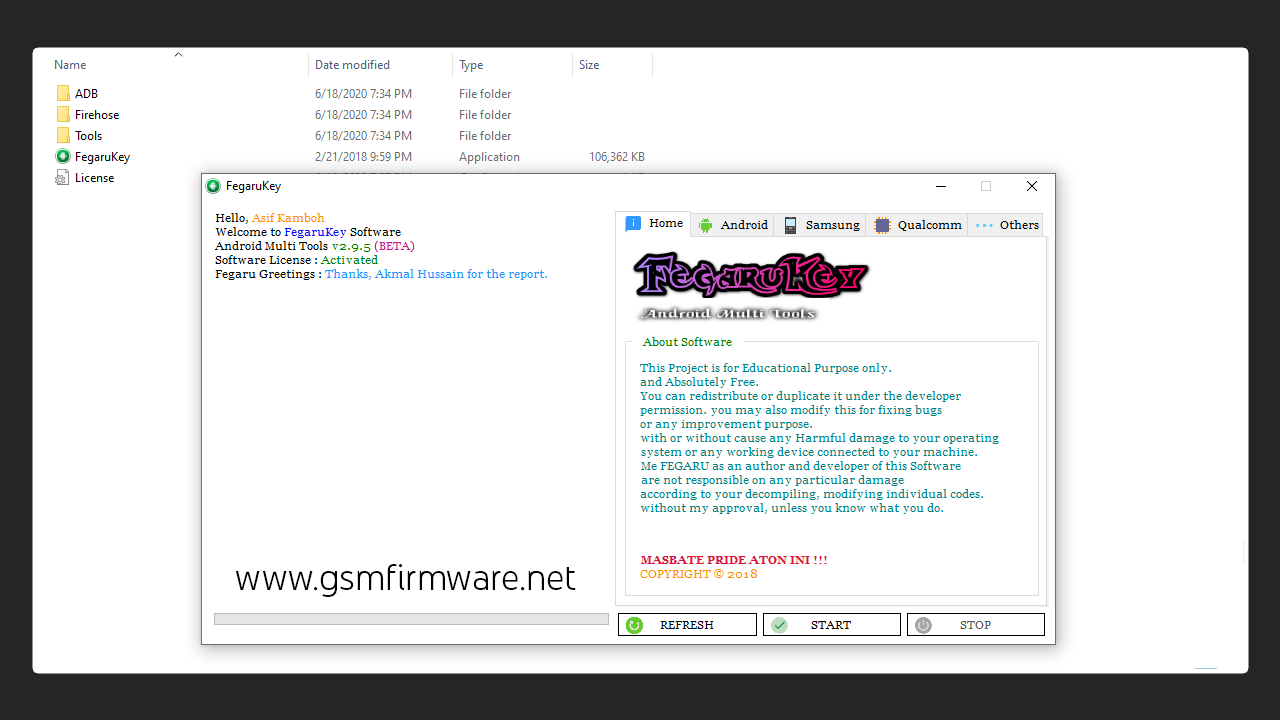
FegaruKey Android Multi Tools is a GSM-based Android mobile software repair tool designed for educational purposes only and is free for all users. FegaruKey Android Multi Tools developed by FEGARU. This tool supports multiple devices from different companies like Samsung, Asus, Xiaomi, Oppo, etc.

The author and developer of this program are allowed to redistribute or reproduce with the permission of the developer. You can fix this bug fix or customise this program for better purposes. FEGRU is not responsible for any particular loss without the approval of the developer who modified the individual code.

As the author and developer of this program, FEGARU is not responsible for any significant damage to your operating system or any working devices connected to your machine.

What Is FegaruKey Generator?
The FegaruKey Generator is a keygen tool that will generate the key to the FegaruKey Android Multi Tools Activation Key from your Computer Hardware Identification ID (HWID).

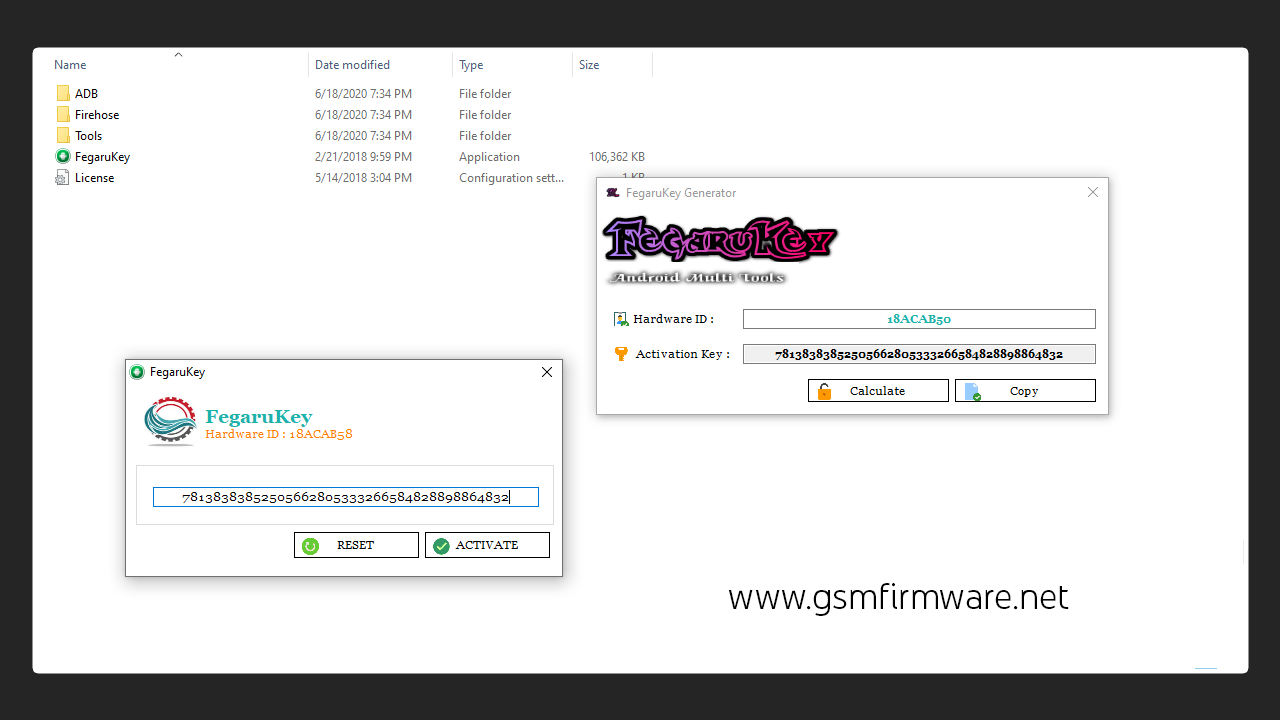
When you first launch the FegaruKey Android Multi Tools program that will show the eight-digit hardware identification ID of your computer system, you must note this ID and type it into the FegaruKey Generator Tool Hardware ID box. And click the Generate button which will show you the activation keys. Use this activation to activate the FegaruKey Android Multi Tools program license.

What Are the Features of FegaruKey Android Multi Tools?
ADB:
  • Read Information
  • Factory Reset
  • Reset Pattern/Pin/Face Lock
  • Enter Recovery Mode
  • Enter Fastoot Mode
Fastboot (FRP):
  • Check
  • Micromax (ADB)
  • Spreadtrum
  • HTC
  • Lenovo
  • Xiaomi (Old Method)
  • Qualcomm
  • Motorola
  • Asus
  • Yuphoria
  • Acer
  • Exit Fastboot Mode
Samsung:
  • Enter Download Mode
  • Software Fix
  • Remove FRP
  • Remove FRP (ADB)
  • Factory Reset
Qualcomm:
  • Remove FRP
  • Format
  • Apply Manual Loader
Qualcomm Fastboot Mode:
  • Enter EDL Mode
  • Unlock Bootloader
  • relock Bootloader
  • Remove FRP (Fastboot)
APK Manager: (No Root Required)
  • Install App Inspector
  • Get Android Content Package
  • Start Uninstall

How to Install and Activate FegaruKey Android Multi Tools?
  1. First, disable antivirus and other antivirus programs from your computer.
  2. Then download the desired program and keygen files from the links below.
  3. After downloading, extract the compressed file using the latest version of the WinRAR program.
  4. I have uploaded this program portable set up, so there is no need to install it.
  5. Now launch the "FegaruKey.exe" program setup file and note down your hardware ID.
  6. Launch the key generator file and type your hardware ID in it and click on the generate button, then keygen will show the activation key.
  7. Paste the activation key into the FegaruKey Android Multi Tools Registration dialogue box and click the Activate button.
  8. That's all, now you have FegaruKey Android Multi Tools v2.9.5 (BETA) program license, and you can use this tool for life.
Make sure that Defender and other virus protection programs are closed on your computer; otherwise, this program will not work correctly.

The Screenshots of the FegaruKey Android Multi Tools.
http://perrojaus.blogspot.com/2020/06/fegarukey-android-multi-tools.html

http://perrojaus.blogspot.com/2020/06/fegarukey-android-multi-tools.html


What Is the Content of FegaruKey Android Multi Tools Files?
-FegaruKey Android Multi Tools v2.9.5 (BETA) Free By [FEGARU]
ADB
Firehose
Tools
FegaruKey.exe
License.ini

-ADB
adb.exe
AdbWinApi.dll
AdbWinUsbApi.dll
fastboot.exe
fastboot-edl.exe

-Firehose
oppo_a37.mbn

-Tools
odin.exe

-FegaruKeyGen
FegaruKeyGen.exe

What Are the Details of the FegaruKey Android Multi Tools?
After clicking the download button, the download number will show how many people have downloaded this tool.

Name Data
Program FegaruKey Android Multi Tools
Version v2.9.5
Size 13.41 MB
Date Thursday, June 18, 2020
Visits
...
Downloads ...
Price Free Activation
Developer FEGARU
Category Tools
Requirement Windows XP, 7, 8, 10
Password perrojaus.blogspot.com


Download Link for FegaruKey Android Multi Tools.


  • FegaruKey Android Multi Tools v2.9.5 (BETA) Free By [FEGARU]

The default password for compressed files is "perrojaus.blogspot.com".

Minggu, 14 Juni 2020

Download Nokia (OST) Online Service Tool - V6.2.8 With Patch

https://perrojaus.blogspot.com/2020/06/nokia-ost-online-service-tool.html


What Is Nokia (OST) Online Service Tool?
The Nokia (OST) online service tool is an official flash tool, developed by HMD Global to flash the firmware files of its Android mobile phones. This flash tool is also known as "Nokia OST LA." As I said, it is an official flash tool; that is why this tool is mostly used in Nokia service centers and companies to recover or update the mobile software (OS) of Nokia Android devices.

Nokia's official stock ROM/firmware files are in .nb0 and .mlf extensions, and the Nokia OST LA v6.2.8 (Patch) Flash Tool can flash both of these extension files.

The official version of the OST tool requires a username, password, and domain (fihtdc.com, fih.gd, cmcs.nj.com, idpbg.efoxconn.com) server to use. And a valid login account is only available to Nokia Service Center representatives. The average user must first patch this flash tool to flash Nokia's official firmware flash files.

This tool can flash both Nokia Android bootloader locked and unlocked mobiles, And below is a list of Nokia smartphones that support this Flash tool:
  • Nokia 1
  • Nokia 1 Plus
  • Nokia 1.3
  • Nokia 2
  • Nokia 2.1
  • Nokia 2.2
  • Nokia 2.3
  • Nokia 3
  • Nokia 3.1
  • Nokia 3.1 Plus
  • Nokia 3.1A
  • Nokia 3.1C
  • Nokia 3.2
  • Nokia 4.2
  • Nokia 5
  • Nokia 5.1
  • Nokia 5.1 Plus (Nokia X5)
  • Nokia 5.3
  • Nokia 6
  • Nokia 6.1
  • Nokia 6.1 Plus (Nokia X6)
  • Nokia 6.2
  • Nokia 7
  • Nokia 7 Plus
  • Nokia 7.1
  • Nokia 7.2
  • Nokia 8
  • Nokia 8 Sirocco
  • Nokia 8.1 (Nokia X7)
  • Nokia 8.3 5G
  • Nokia 9 PureView
  • Nokia C1
  • Nokia C2
  • Nokia C2 Tava
  • Nokia C2 Tennen
  • Nokia C5 Endi
  • Nokia X71
What Is the Patch of Nokia (OST) Online Service Tool?
Nokia's (OST) patch is a small piece of Nokia (OST) Online Service Tool that can be applied once the OST LA v6.2.8 program setup is installed. The Nokia OST tool patch is unofficial because the patch was not created by the HMD Global developer, which is considered an "unofficial patch". After applying this patch to the Nokia OST tool, You will be allowed to use all the features of the Nokia OST Flash Tool without a login account. Simply put, this crack/patch allows users to restore Nokia's official stock ROM file for free using the online service tool OST LA.


How to Install and Patch the Nokia (OST) Online Service Tool?
  1. First, you need to download the OST tool setup and patch files.
  2. After downloading, extract the compressed file and launch the "launcher.exe" setup file.
  3. Click the Next button, then click Next. The installation will begin. After the installation is complete, click the Close button.
  4. Now go the Nokia OST LA program installation directory according to your windows operating system C:\Program Files (x86)\OST LA or C:\Program Files\OST LA.
  5. Paste the crack files "MobileFlashDll.dll, OnlineUpdateTool.exe" in the program installation folder and click Replace the file in the destination.
  6. Then delete the "OnlineUpdateTool.exe.config" configuration file from the program directory.
  7. Launch the "OnlineUpdateTool" setup file, as soon as you launch the setup, a login message will appear on the screen.
  8. Then leave the Account and Password box blank, and select the "fihtdc.com" domain and click the OK button.
  9. When you click the OK button, the Flash tool will launch.
  10. Now the Nokia (OST) Online Service Tool - V6.2.8 has completed the cracking process so that you can use all the features of this program for free.
When you replace the patch files in the program installation directory, confirm that the flash tool is completely closed. And when you launch the patched Flash tool, leave the Account and Password fields blank and click the OK button.
How to Flash Nokia Android Mobile Using Nokia (OST) Online Service Tool?
  1. Go to Nokia (OST) Online Service Tool installation directory "C:\Program Files (x86)\OST LA" and launch the "OnlineUpdateTool.exe" program setup file.
  2. When you launch the setup file, a login message will appear on the screen. Leave the Account and Password fields blank and click the OK button.
  3. After launch, click the Next button.
  4. Click on the three dots and select the exact stock ROM/firmware file of your mobile (the firmware file will be in .nb0 or .mlf extension)
  5. Turn off your mobile device and boot it into download mode. (Press and hold the volume down and power buttons together and connect your mobile device to the computer, Wait for your phone to vibrate, and you will see a 'Powered by Android' logo on the screen along with 'Download Mode' in the top left corner.).
  6. When your mobile is connected to the computer in download mode, the 'Edit information in phone' button will be highlighted. Click this button and wait until you you get ‘Failed to reboot to FTM mode’ error message. Click OK in the error message and then the Next button will be highlighted.
  7. Click the Next button to begin the flashing process. As soon as you click next, the flashing process will start, and it will take about five to ten minutes to complete the process, and as soon as the flashing process is complete, your mobile will restart in normal mode.
Make sure your mobile battery is over 30% charged and have Nokia HMD Global USB drivers installed on your computer.
The Screenshots of the Nokia (OST) Online Service Tool.
http://perrojaus.blogspot.com/2020/06/nokia-ost-online-service-tool.html

http://perrojaus.blogspot.com/2020/06/nokia-ost-online-service-tool.html
 
What Is the Content of Nokia (OST) Online Service Tool Files?
-Nokia (OST) Online Service Tool - V6.0.4 + Patch
OST v6.0
Patch

-OST v6.0
Deployment
Driver
launcher.exe
OSTLA_v6.0.4.ms_

-Deployment
dotnetfx.exe
vc90redist_x86.exe
vcredist_x86.exe
vcredist_x86_v8_0_61001.exe

-Driver
Phone_F_USB_Driver_v3.5.0.msi
Phone_M_USB_Driver_v1.2.0.msi
Phone_Nokia_USB_Driver_v1.1.0.msi

-Patch
OnlineUpdateTool.exe

-Nokia (OST) Online Service Tool - V6.1.2 + Patch
OST V6.1.2
Patch

-OST V6.1.2
Deployment
Driver
launcher.exe
OSTLA_v6.1.2.ms_

-Deployment
dotnetfx.exe
vc90redist_x86.exe
vcredist_x86.exe
vcredist_x86_v8_0_61001.exe

-Driver
Phone_F_USB_Driver_v3.8.0.msi
Phone_M_USB_Driver_v1.2.0.msi
Phone_Nokia_USB_Driver_v1.4.0.msi

-Patch
OnlineUpdateTool.exe

-Nokia (OST) Online Service Tool - V6.2.8 + Patch
OST V6.2.8
Patch

-OST V6.2.8
Deployment
Driver
launcher.exe
OSTLA_v6.2.8.ms_
readme.txt

-Deployment
dotnetfx.exe
vc90redist_x86.exe
vcredist_x86.exe
vcredist_x86_V10_0_40219.exe
vcredist_x86_v8_0_61001.exe

-Driver
Phone_F_USB_Driver_v3.8.0.msi
Phone_M_USB_Driver_v1.2.0.msi
Phone_Nokia_USB_Driver_v1.4.0.msi

-Patch
MobileFlashDll.dll
OnlineUpdateTool.exe

What Are the Details of the Nokia (OST) Online Service Tool?
After clicking the download button, the download number will show how many people have downloaded this patch tool.

Name Data
Program Nokia (OST) Online Service Tool
Version V6.2.8
Size 108 MB
Date Saturday, June 13, 2020
Visits
...
Downloads ...
Price Free Patched
Developer HMD Global
Category Flash Tool
Requirement Windows XP, 7, 8, 10
Password perrojaus.blogspot.com


Download Link for Nokia (OST) Online Service Tool.

  • Nokia (OST) Online Service Tool - V6.2.8 + Patch
| Google Drive | One Drive | MediaFire |
  • Nokia (OST) Online Service Tool - V6.1.2 + Patch
| Google Drive | One Drive | MediaFire |
  • Nokia (OST) Online Service Tool - V6.0.4 + Patch

The default password for compressed files is "perrojaus.blogspot.com".

Jumat, 22 Mei 2020

SuperTool Samsung Software Version 1.0

https://perrojaus.blogspot.com/2020/05/supertool-samsung-software.html

What Is Samsung Super Tool?

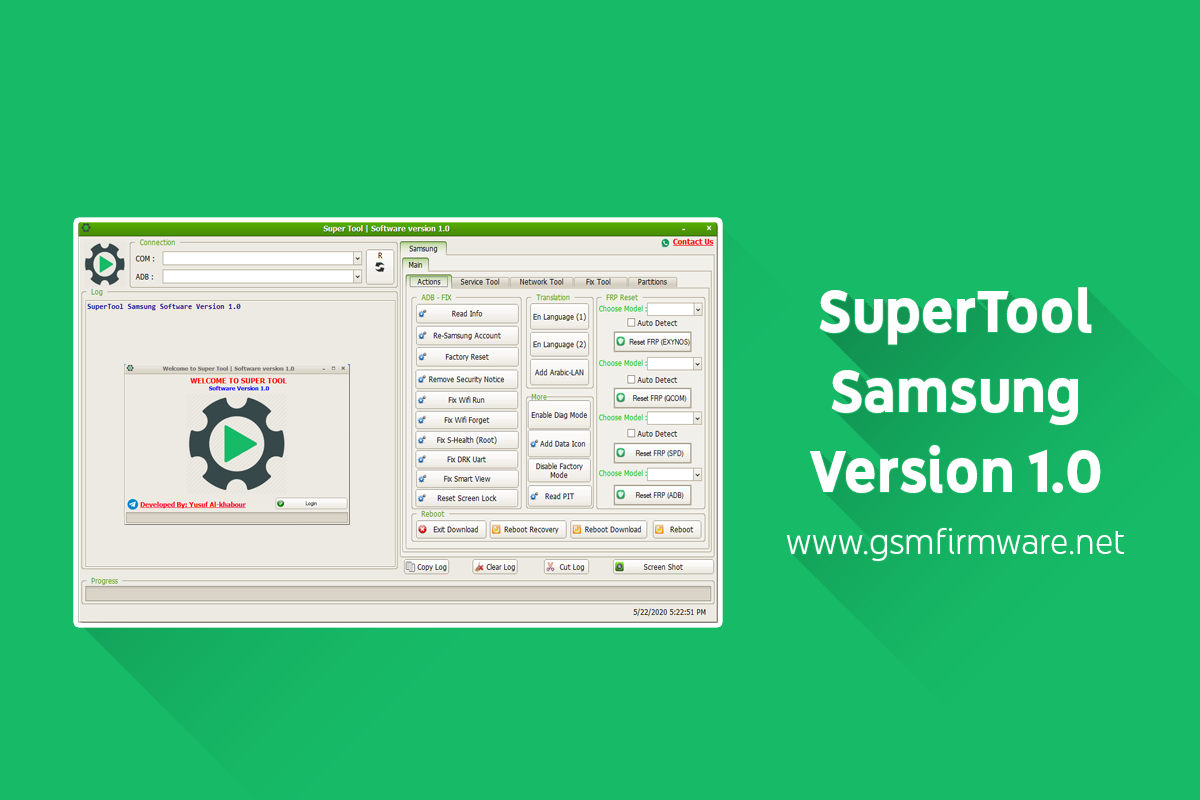
Samsung Super Tool is a free software service program for Samsung devices developed by Yusuf Al-Khabour, This program works in COM and ADB mode, and this tool designed for Samsung devices only, It is a Windows operating system program that is compatible with all Windows XP, 7, 8.1, and 10, The installation setup of this program is password-protected, and the password is "SPR-TEAM".

What Are the Features of the Samsung Super Tool?
  • ADB FIX
  • Read Info
  • Re-Samsung Account
  • Factory Reset
  • Remove Security Notice
  • Fix Wifi Run
  • Fix Wifi Forget
  • Fix S-Health (Root)
  • Fix DRK UART
  • Fix Smart View
  • Reset Screen Lock
  • Translation (EN Language 1, EN Language 2)
  • Add Arabic-LAN
  • Enable Diag Mode
  • Add Data Icon
  • Disable Factory Mode
  • Read PIT
  • Reset FRP (EXYNOS)
  • Reset FRP (QCOM)
  • Reset FRP (SPD)
  • Reset FRP (ADB)
  • Reboot (Exit Download, Reboot Recovery, Reboot Download, Reboot)
  • Service Tool
  • EFS/NV Data
  • Read NV
  • Wipe NV
  • Write NV
  • Reset EFS
  • Read EFS
  • Write EFS
  • Reset MSL
  • EFS/NV Data (Method 2)
  • SEC/EFS
  • Read Security
  • Write Security
  • Wipe NV
  • Reset EFS
  • Read EFS
  • Write EFS
  • Reset FRP
  • Network Tool
  • IMEI Repair (IMEI1, IMEI2)
  • Restore IMEI Original (ROOT)
  • Enable Diag (Method 2)
  • Enable Hidden Menu (Method 1)
  • Enable Hidden Menu (Method 2)
  • Enable UART (Method 2)
  • Read Serial Number
  • Change Serial Number
  • Change WiFi Mac (ROOT)
  • Read WiFi Bluetooth
  • Fix Tool
  • Repair USSD Codes
  • Set Single SIM
  • Unlock Network Chine Telecom 1
  • Unlock Network Chine Telecom 2
  • Remove Sprint Apps
  • Remove T-Mobile Apps
  • Remove Verizon Apps
  • Remove ATT Apps
  • Fix MIPI at Combination
  • Set Dual SIM
  • Reset Samsung Account (Download Mode)
  • Add Arabic to Keyboard
  • Add Farsi to Keyboard
  • Remove RMM (ROOT)
  • Partitions
  • Restore IMEI Original (Download Mode)
  • Fix Show IMEI Root
  • WiFi Setting
  • Read WiFi Mac
  • Disable WiFi Power Saving Mode
  • Remove Screen Lock ADB (System UI)
  • Remove Screen Lock (Root)
  • Wipe EFS, Repair Security
How to Install Samsung Super Tool?
  1. First, disable antivirus, defender, and other virus protection programs from your computer.
  2. Download and run the installation program setup "Super Tool v1.0.exe" file.
  3. When you launch the setup file, it will ask you for a password. Enter this password "SPR-TEAM" and then click Next.
  4. Click Next and then click Install when the program installed on your computer, click Finish.
-SuperTool Samsung Software Version 1.0
Password.txt
Super Tool v1.0.exe

Download Link:


  • SuperTool Samsung Software Version 1.0
The default password for compressed files is "perrojaus.blogspot.com".